Monday, March 3, 2014

Great video made by a Spanish friend for Xilisoft Video Converter

Mejor Conversor y Editor de VĂ­deo Para Windows/MAC | Xilisoft Video Conv...

If you know several kinds of language, what will you do?

I always think if I know several kinds of language, I will travel around the world. The dream always stop where you think of but realized where you start from. Whenever a good idea flow through your mind, grasp it and try to realize it. 

There are different ways for realize a dream. For example, I don't know other language except English and my mother language. But the dream to travel around the world can also be realized. I just need to speak English with others. As English is an international language. This video is also a good example. I don't know Spanish, but my Spanish friend know it. We both can speak English, which makes the conversation available. Now let's enjoy the wonderful video to know more about Xilisoft Video Converter Ultimate V7.


If you have any interest in the topic above or have interest in the video converter, please leave comments.


Sunday, March 2, 2014

How to clip Video/Audio files with Xilisoft Video Converter Ultimate V7?

How to clip Video/Audio files with Xilisoft Video Converter Ultimate V7


Here is the third feature of Xilisoft Video Covnerter Ultimate V7: Clipping video/audio files.
It's a simple operation. Please follow the steps in my screenshot to complete the easy and interesting clipping game.

First, add the files(video or audio) you want to clip. You can add it with the "File" menu or the "Add File(s)" button circled in the pic.


Second, Click the "Clip" button, which signed with a pair of scissors to open the "Clip" window. 


Third, set the segment duration. You can set the start and end time with dragging the yellow sliding head or enter the exact start and end time in the bellowed Duration box.


Forth, Click "Apply" to complete clipping. 


Easy? 
Next blogger will talk about how to merge the clipped segment as a whole file.
At last, I want to talk about what I got last week.
Sometimes,  I will feel disappointed if I got nothing from the past days. Recently, the company is trying to improve every employee's ability. I tried to improve myself through reading. I got to know that it's not others' reason but ourselves whenever you failed in work. Here are two achievements deserving to share with you: First, regard yourself as the company owner; second, finish every plan in your schedule.


Thursday, February 27, 2014

My experience using Xilisoft Video Converter (2. 3D Video Conversion)


My experience using Xilisoft Video Converter (2. 3D Video Conversion)


To start a work, the first thing is to know the work content and the product. The following is my real feeling while trying the first product Xilisoft Video Converter Ultimate V7.
Yeah, it has been almost one month past from the day I first tried this product. But the experience feeling left clearly. Those days I felt so urgent to know all the program. As I am always keeping high interest in high tech product, especially the software. In the last blogger, I introduces how to start the program, here I will share one of its amazing features: 3D Video Conversion.
3D movie is much attractive that most young people would like to have a try the close feeling to the scene in the film, so am I.
The following valuable info was also found from the tutorial page. But the content at the bottom is my real experience.

3D Video Conversion
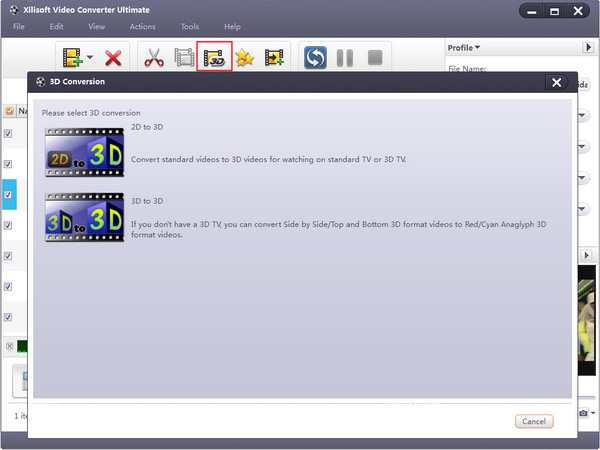
Choose the file you want to convert in the file list, and Click “3D Conversion” button on the toolbar to enter “3D Conversion” window.


2D to 3D
You can convert 2D standard videos to 3D videos, and watch it on TV.


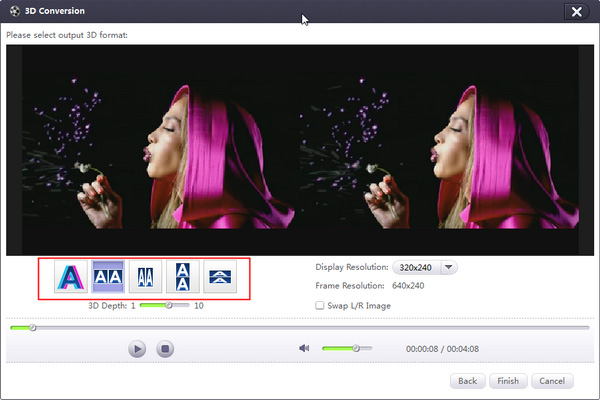
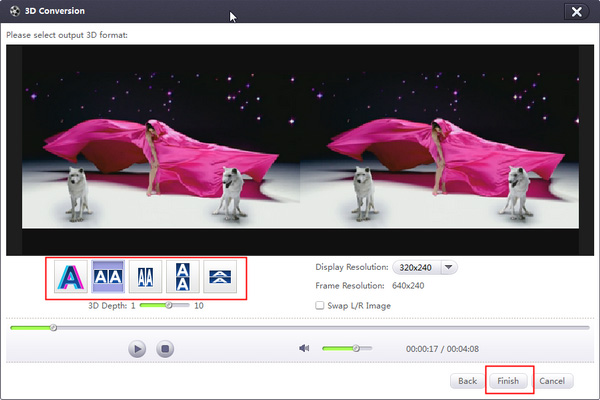
Click "2D to 3D" button to open settings interface.Click "Anaglyph (Red/Cyan)", "Side by Side", "Side by Side (Half-Width)", "Top and Bottom" or "Top and Bottom (Half-Height)" under the preview area, select an output mode.

Tips:(1) You can drag the “3D Depth” control slider to set the depth.(2) Check the “Swap L/R Image” option, you can switch left and right eye's image.Click "Finish" to return to the main window.


3D to 3D
The software supports conversion between different 3D video format.Click "3D to 3D" button to open settings interface.Click "Side by Side", "Side by Side (Half-Width)", "Top and Bottom" or "Top and Bottom (Half-Height)" under the preview area, select a source mode.Click “Next” button to return to next step.Click “Anaglyph (Red/Cyan)”, “Side by Side”, “Side by Side (Half-Width)”, “Top and Bottom” or “Top and Bottom (Half-Height)” under the preview area, select an output mode.Tip: Check the "Swap L/R Image" option, you can switch left and right eye's image.Click "Back" to return to previous step. If you click "Remove 3D Conversion Settings", then the 3D conversion will be removed.Click "Finish" to return to the main window.


The first time I got the license code of this Xilisoft Video Converter Ultimate was to find a 2D video to try its feature of 3D Video Conversion.
I added a video and click the "3D conversion" buttomn, then found that there are five options for different kind of 3D modes. I was confused, because I cannot understand the meaning of the options: "Anaglyph (Red/Cyan)", "Side by Side", "Side by Side (Half-Width)", "Top and Bottom" and "Top and Bottom (Half-Height)". Judging according the knowledge learnt in my high school physic class, I chose the first one: "Anaglyph (Red/Cyan)". After conversion, I got another video which looks like a shadow attached. It's interesting. I found a pair of physic glasses once used in the 3D cinema, amazing, 3D video enjoyed at home!
Sometimes the tutorial is detailed but unnecessary, we should try to explore a mush easier way. The things I like most of all is personal achievement for trying new stuff. How about you?


My experience using Xilisoft Video Converter (1. Basic operation)


My experience using Xilisoft Video Converter (1. Basic operation)


This is the first program I tried from Xilisoft, which can converter various of video formats.

At first, I don't know how to run it, feels self-stupid with the high tech product. I remember a saying in one book that all questions have responding answers. Memory fades away with time going, not sure the original saying. But I know I should find the way to solve problem while meeting problem.

Finally I found the following step tutorial on the product page:

Step 1: Install and run the software

After installation, run the software. You can see the main interface as below.


Step 2: Add File

Click “Add File(s)” button on the toolbar or select “File> Add File(s)” on the main menu to load files.


Step 3: Select output format

Select the files need to be converted and click “Profile” button to select the output format in the drop-down list. Then click “Browse…” button to specify destination folder for saving output files.


Always I want to be a guru for something, while there is no other stuff interest me. Also being a new staff of this famous software corporation, I think it's an opportunity for me and my reader to know more about their program and service. I hope my article will not disappoint you. I will give the most objective words about xilisoft program instead of saying good words only.


Believe me, believe my blogger!


Wednesday, February 26, 2014

Some suggestions for software website promotion

Some suggestions for software website promotion


To promote a website, the first and most important is to know the website style first.
There is a saying that only the one who knows both the enemy and himself can be the final winner. To a software website, it is not easy to find others for helping promote. There is no physical product to attract viewers. All of us are interested in real product that can be touched. While there are also lots of methods to realize attracting number of collaborators for helping to promote.

Here are few tips:
1 Submit products to certain website for users testing download.
2 Contact with ad website.
3 Find famous reviewers to write product review.
4 Build a customer group for talking and communicating about the customer experience.
5 Create a blogger to share your experience with others.

All the above is what I learnt from my experience. At last I want to recommend the nice software providing website Xilisoft Corporation to my first viewers.
If this article is useful to you and you want to read more, my blog will keep going on.